It’s also a great way for bloggers to get more exposure, it’s true. But believe it or not – Pinterest can be a huge headache for some bloggers and artists. Didn’t realize there was a downside to pinning? Well, today I’m going to give you the inside scoop on how to be a responsible pinner. If you’ve been unknowingly committing any of these “offenses” – don’t feel bad. It’s not something you think about until you’re on the other end of it. All I want to do is help my fellow pin-addicts everywhere to see this from another perspective, so we can all play nice on what’s arguably one of the most entertaining social sites around.

1. Don’t: Assume everyone wants to be pinned.
The biggest way to tell if someone wants to be pinned: do they have a Pin-It Button on their site already? I take that as implied permission to pin away (following etiquette, of course). But artists and photographers, especially, don’t always want their work pinned. Some bloggers don’t want photos of their kids pinned, either. Check their disclosure/terms of use/copyright policy. Many times it’s right in their sidebar. If they ask you not to use certain photos, that doesn’t just mean in published posts or articles, it means pinning, too.
If you don’t see something that looks like permission to pin – it’s better to ask. Email the blogger or leave a comment. I’ve seen a lot of people comment lately that if something is on the internet, then it’s fair game. That is NOT TRUE. Things published on the internet still belong to someone – they are the publisher’s intellectual property. That means they absolutely have the right to ask anyone to remove their material from any site, for any reason. But do these publishers a favor – if you do admire their work, take a moment to check if they are all right with you pinning it. (And for the record, I love it when you pin from Happy Hour!)
(Want to know how to prevent certain photos from being pinned? Practically Functional has a great tutorial! Like being pinned and want to install the Pin-It Button on your site? I used the tutorial at Kevin & Amanda to install mine!)
2. Don’t: Pin the first image you see.
You should always pin from the source. It’s fine if you’re actually AT the source. But if you’re browsing a link party, a round-up post, Craftgawker, etc. – take a moment and click through to the original site before you hit “Pin It”. Think about it – if you like the idea, if anyone likes the idea enough to re-pin it, they might want to know more about it. There’s nothing more frustrating than clicking a pin on Pinterest, only to have to click through that site to another, and perhaps to yet another before you can find what you’re looking for (if you even find it). Your followers will ALL appreciate sourcing your pins correctly. ;)
(Want to help people find your source post if you’re the subject of a bad pin? Watermark your photos. ALL of them. It’s a time-consuming step, but it will help people find you if they spot you through a broken pin. I have had people report bad pins to me and tell me they found me because of my watermark! I also get searches all the time for “happy hour projects wish bracelets” – they’ve seen the photo, and they Google search to find the source.)
3. Don’t: Pin from the homepage/main page of a site.
This one is a really easy one to do. You’re browsing a blog, you scroll through all the posts, you find something amazing – maybe lots of somethings. You start pinning, scroll through older posts, and pin some more. But you know what you just did? You pinned everything from the main site. That means that if you (or anyone who re-pins from you) wants to go back and check out that tutorial or recipe, they will be directed to the most recent post. And the more time that passes between pinning and clicking through, that’s even more material you will have to sort through to find what you’re looking for.
How do you make sure you’re pinning from the post itself? Click on the post title, that will usually direct you to the address of the post, and not the main blog or website. Can’t tell the difference? Look at what the address bar says. You want to see some sort of longer link there. If you were pinning this post, for example, you’d want to make sure you’re pinning from:
http://www.happyhourprojects.com/2012/08/how-not-to-pin-on-pinterest.html,
and not:
http://www.happyhourprojects.com.
Now, bloggers don’t really mind if people have to browse around to find what they’re looking for… but the average Pinterest user isn’t going to want to take a lot of time, when there are so many other lovely pins to check out. It’s something you should be doing for your followers – directing them to the goods… well, directly. ;)
4. Don’t: Put the recipe or the instructions in the Pin Description.
Yes, there are 500 characters available. I have no earthly idea why. You may think you’re saving a step by including more information, but bloggers really hate that.
By including the recipe or instructions, you make it so that no one needs to visit that website to get the information. You have bypassed the publisher and become the source. (Remember I mentioned that is the publisher’s intellectual property?)
Now, what’s the big deal, if these bloggers share information for free? Well, some bloggers have ads on their sites, or contacts with companies that depend on the number of page views. Page views = revenue. You are taking money out of their pocket any time you pin in a way that causes people not to visit the source.
If you’re thinking, wait a minute – people are blogging for money? In most cases, not the way it sounds! But there is an investment in both supplies and time that go into offering free tutorials, tips, and recipes. I’m spendng 10-12 hours a week blogging, and a few dollars on each project, many times. Some bloggers may be making nothing more than $20 a month in advertising – but maybe that’s enough to pay for baking supplies, so they can keep offering free recipes! Ultimately – it comes back to this: if you enjoy their work enough to pin it, the least you can do is allow them to get the page views from others who want to know more. You liked the post – pin in a way that encourages other people to visit it, too.
(Found a pinner who shared an entire recipe or tutorial from your site? First, be nice about it. No one does this on purpose! Leaving a nice comment asking them to edit their pin will often do the trick. If they don’t respond or won’t change it, you can report the pin and have it removed. Pinterest will remove it pretty promptly – it takes less than a day when I’ve had to report a pin.)

5. Don’t: Be a spammer or a jerk.
I don’t think this applies to anyone reading. Spammers and jerks who make rude comments probably don’t read etiquette articles, and if they do, I doubt they care my thoughts on the matter. But I want to mention this because if you have found your image pinned to another site (especially an unsavory site), report it immediately using the steps above.
How can you find if this is the case? I regularly search the keywords of some of my most popular projects on Pinterest. If I spot anything where my photo has been altered, or if it links to another site (other than one I’ve linked to), then I report it.
If someone says something rude about one of your pins… I’m sorry. Don’t take it personally! It comes with the territory to get some negative feedback along with the positive. If you leave negative comments, just keep in mind the blogger can (and probably will) see them. Yes, we keep tabs on our pins. (Not sure how to check what’s being pinned from your site? Threading My Way has a great post that talks about this!)
6. Don’t: Miss out on repins.
When we’re looking for inspiration, Pinterest is one of the first places we go, right? When you search Pinterest, it only browses the description, so make those keywords count! A description of “yummy” or “yes, please” isn’t going to bring your pin up in search results when people are looking for “strawberry pretzel salad”. It’s going to bring up pins that say “strawberry pretzel salad”. You have so much more potential of being re-pinned if your descriptions are easily searched.
(Blogger tip: Installing the Pin-It button to my blog defaulted the description on pins to be the post’s title. This makes it easy for pinners to include a good description. How many times have you see a description of “.”? Not everyone wants to take the time to add a description, so do it for them! Again – I used the tutorial at Kevin & Amanda to install mine.)
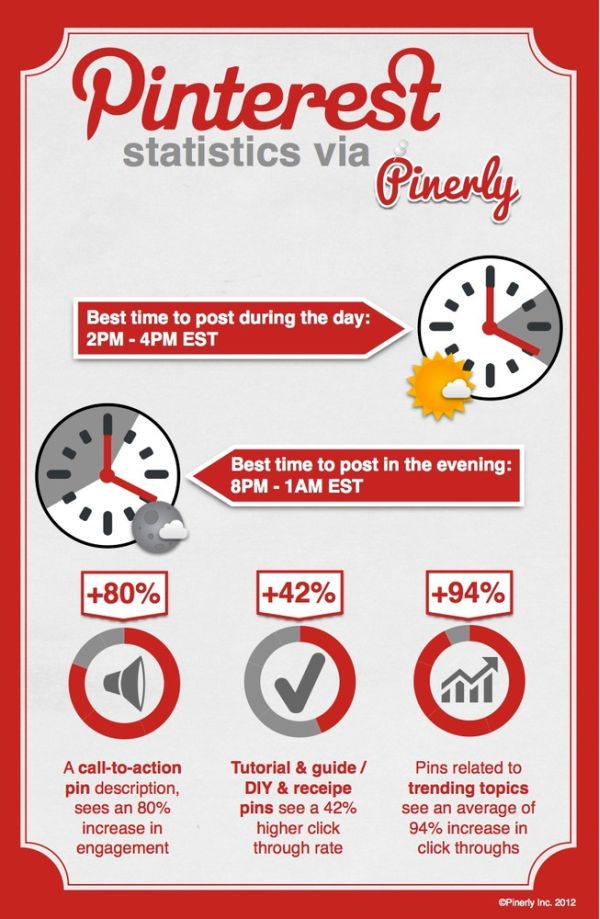
If you *really* want to maximize your chances at being re-pinned, you can also track and analyze your pins by using Pinerly. I have to confess, I haven’t gotten at all involved in Pinerly, though they did email me this fabulous little infographic about the days and times to pin to reach the biggest audience which I found very interesting:
Maybe re-pins aren’t that important to you, but I always love to see when the things I share are popular. :)
I hope this little list has been helpful, and that you take it for what it is: suggestions of how to make Pinterest more fun for everybody. Do you have any tips not listed here? Feel free to discuss them in the comments!
I link up to these great parties! 
Great tips, Adrienne. I disagree, though, on one point. I understand not putting an entire recipe in the description box, but as a user I find it enormously helpful to have the ingredients list there. I’m happy to go the original website for measurements and directions, but when shopping it’s easier to just pull up the pin to ensure I’m buying the right items. It seems the ingredients list, without measurements or the rest of the recipe, should fall under fair use and would be a service to the user.
Here’s another one, don’t troll etsy for pretty things and then pin the items someone else made and is selling as part of their BUSINESS onto your craft and things to make board. It’s driving me insane! Please people, don’t do that.
Great post, it can be quite sad how people think that pinning every picture is the thing they should do. It’s important to just post what’s beautiful!
Great post!
Forgot to mention that I did an early post on my Pinterest addiction, and said I was hoping to use it for good not evil. :) I always try to find the original source. As a newbie blogger, though, your links were fabulous!
New here! Wonderful tips for bloggers and pinners. Thanks for all the info and links, too!
Newest follower!
Great tips! The one that really kills me is when people copy the entire Instructions section of my posts into a pin. Ugh! And thanks for linking to my post about preventing photos from being pinned :-)
Thanks for sharing at The Fun In Functional!
YES! You hit on a lot of pinning pet peaves. I have one more to add please. I hate when I see a photo pinned with a description that has instructions (similar to rule #4), but when I click on the pin and get to the original site, I see the instructions don't even match the post. It's like someone stole that blogger's picture, used their website, and made up a new set of instructions. Maybe it's like the telephone game. Whatever it is, people need to go to the original site/blog before repinning and should never make up false details in the description part. Okay, so glad you let me get that off my chest! Thanks for a great post! I found you through live laugh rowe's link party.
Bonny @ http://thedomesticatedprincess.blogspot.com
FANTASTIC!! I just described my oun pinterest woes in a recent post and I love what you sashay here. I would love for you to link up to my blogging tips party if you are interested. This is such an important topic.
<3 Christina at I Gotta Create!
http://igottacreate.blogspot.com Tips Cafe link party
Thanks for the tips! I'm pinning this article :) Hopefully more folks out there will see that there is a right and a wrong way to pin things! :)
You can report any pin for nudity or pornography, it's actually the top reason for reporting. I posted a little graphic under #4 for reporting pins, it's even fewer steps to report something for one of the standard, prohibited pins like that.
Thank you for sharing these tips! Excellent, much appreciated!! :). One question.. I have seen very graphic porn and have reported pins, just wonder what Pinterest feels about this. I go to Pinterest to relax, and it is so sad and bothersome to see these images. My main concern is that children can see these. If you have any tips/info on this I would greatly appreciate it.
Very good information. Thanks for taking the time to put this together. Non-bloggers don't realize how much time we put into our blogs and how we just want credit for our work.
Thanks for posting this. We have a commercial video and photography studio, and have had to deal with copyright issues for 25 years. With the explosion of social media, we've had to be ever so diligent in protecting our work, which adds more time to our work day (and cuts into any profit making time). When people get a glimpse into what we have to do for tracking, and the reasons why, it is a real eye-opener. So, thank you! More people need to be aware of this.
Great post! Thank you for raising Pin awareness!
Good info Adrianne! I few comments I'll make.On photos you don't want pinned, use the tutorial, you provided the link. Most people are pinning on the fly and not going to stop and look for a disclosure statement.
As for Pinerly-I just went to the site, through your link, and it needs lots of work. I signed up but then there are no directions or any statement of how to use the site or how it will benefit the user, maybe I missed it?
I use pinterest as my virtual recipe box so I love finding new things there!
Fun tips! Thanks for linking at the Winthrop Chronicles!
LB
http://www.accordingtol.com
Great article!
Well put.
Great info! I am a new follower through “Kathe with an E.”
Genius post miss Adrianne! I get so frustrated with pins that lead to nowhere!
Carlee
http://www.ladybirdln.com
Fantastic post, A! Great tips…thanks for sharing them!
Really good tips – I always post the original source unless it is a craft' roundup. Crafterminds had a really good post about those horrible long skinny posts detailing entire tutorials here: http://crafterminds.com/2012/08/long-pin-to-make-a-short-point-about-pinterest/ Some time ago I even made a graphic I posted on Pinterest that read: Please do not pin from Duitang – they steal entire tutorials. Since writing my comment on Crafterminds, I've heard that BuzzFeed sometimes also takes entire tutorials without permission. I think that some people on Pinterest and Tumblr (where I blog) just don't care and never will until something they have created is stolen.
Great post Adrianne! These are all great tips.:)
Awesome tips, Adrianne! Thanks.
Great tips, Adrianne. I haven't heard of Pinerly. I'll have to check it out. Thank for the link back!
Great tips and advice, Adrianne!
Super helpful tips! Thanks for the post!
Tess
http://www.theframedlady.com
now I'm trippin trying to think if I have done any of those things…I only one I can think of is pinning something that I am not totally sure that someone wanted it pinned….I have pinned a few of your projects A….hope you didn't mind…
Thank you Adrianne! This was a great post with plenty of good links and tips!