I’m on a roll this weekend with my blog tips. Yesterday I showed you how to turn off word verification on your comments section. But there’s another aspect of commenting that I’d like to bring your attention to: when someone leaves you a sweet comment, or asks you a question, and you go to email them back to thank them – only to discover it came from noreply-comment@blogger.com. So now you wonder where to chase them down to reply, or if you should, or if you can even find them. I’m surprised at how many bloggers don’t leave a way for you to easily visit or respond!
I enjoy emailing back to people who visit me and take the time to say something nice about my post or about my blog. (Raise your hand if you’ve exchanged a half-dozen emails in a day with me, just because you said something nice about my post? Or I’ve commented on yours? LOL!) All of my best blog-friendships started with a simple comment, and then a reply, and then sometimes several replies. In fact, there are some of you who drop by regularly that I would love to get to know better – but you are set to no-reply!
You may not know you’re set to no-reply. Blogger defaults err on the side of your privacy on this one, and I can understand that not everyone who leaves comments wants their email address available to the blog owner for a response. I can respect that. But if you’re not currently getting email replies and you think you would like to, take a moment to check your settings now!
The settings are in your Blogger Profile. First, go to your dashboard. You’ll find your blogger profile by dropping this menu down.

Choose your Blogger profile.

**Update** Thanks to Kelley from Miss Information for getting some additional info – you may have your profile tied to your Google+ profile, not your Blogger profile. If this is the case, you will need to temporarily switch back to Blogger Profile to manage this setting. If you find you are going straight to G+ instead of to your profile to manage your settings, use the lower drop-down menu and choose “Revert to Blogger Profile” (you can switch back to G+ when you are done by going to the same menu).

Now we should all be in the same place. :) Edit your profile by clicking here:
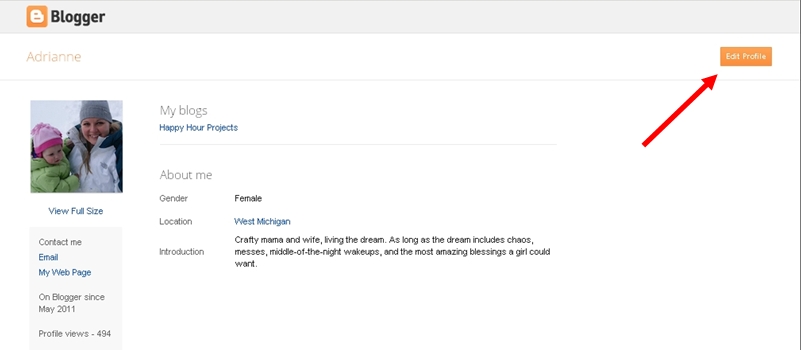
And click the box that says “show my email address”. By choosing other options, like “share my profile”, people will also better be able to find your blog when you leave them a comment and don’t leave your link.

I hope you’ve found these tips helpful. I don’t normally get into blog advice here (because I’m far from being an expert!) but these were topics on my mind this weekend. I don’t know everything, but I enjoy finding out, so anytime you have a question, please feel free to ask!
Now, comment away, but please make sure I have a way to reach you!! ;)
I link up to these great parties!
~ Adrianne
very informative blog. i really like it.
I think, that you are not right. I am assured. Let’s discuss. Write to me in PM, we will talk.
Your blog has become a go-to for me because of how genuine and insightful it is. You bring a refreshing level of honesty to each post, and that’s rare. I love how you combine personal stories with informative content—it makes each post feel grounded and relatable. I always find myself coming back to reread or share with friends. It’s clear that you care about connecting with your audience, and that makes your blog a standout!
Thank you for this informative post. If you are looking for a CMA USA institute in Kuwait, Ledgergate is the best CMA USA institute in Kuwait. you can checkout LedgerGate’s website.
The US CMA course (Certified Management Accountant) is a prestigious qualification designed for professionals seeking advanced expertise in management accounting and financial management. The US CMA course details include two parts: Part 1 focuses on Financial Planning, Performance, and Analytics, while Part 2 covers Strategic Financial Management. To become a certified CMA, candidates must pass both exams, have a bachelor’s degree, and meet two years of relevant work experience.
Really annoying when I try reply to someone and they are no-reply. For me – it is the easiest way to respond to a comment, A lot of my commenters are no-reply. I hope they read this! Thank you!
Thank you for posting such informative blog . I really appreciate your hard work.
“Your blog writing is a true masterpiece, a testament to your unparalleled skill in crafting compelling narratives that educate and inspire. Your ability to blend meticulous research with engaging storytelling is nothing short of extraordinary. Each post is like a well-crafted work of art, seamlessly weaving together insights, analysis, and passion for the subject matter. Your writing not only informs but also invites readers into a world of exploration and discovery. It’s evident that you pour your heart and soul into every word, creating content that leaves a lasting impact. Your blog is a treasure trove of knowledge and a source of inspiration for all who have the privilege to read it. Keep shining brightly and sharing your exceptional talents with the world—you’re making a significant difference!”
hi
Additionally, bloggers can include a note in their comment section or at the end of their posts encouraging readers to leave their email addresses if they’d like a response. This provides an alternative way for bloggers to connect with their audience beyond the comment section.
most of reply is nofollow
Thanks for letting me know this useful information
Thanks for sharing. Its amazing.
It’s really informative blog which you shared with us. Thanks a lot. I got many things to learn about blogging. Keep posting!!!
Thanks for sharing this helpful article with us
Tax saving is a complicated subject for most people, as they do not clearly understand that there are more layers to tax-saving than only the exemptions available on your investments. With the right knowledge, not only you will pay the correct tax on your investments, but also know how to tax proof the income and actually create an asset out of your tax saving.
I appreciate the time and effort to remind those of us who are “newbies” about the ins and outs of the industry! I greatly value your information!
Very good tips. I have gained a lot of knowledge about things related to technology or social networks, which I was quite vague before. Thanks for sharing, I will continue to follow your blog.
Thank you for this amazing article.
Helpful tips and guide that every site owner can follow through it.
Since cough syrups are legal for purchase, many people have abused these medicines; however, since the alcohol has been removed and codeine- visit website Onlineleansyrup.com
Shoes Online- Shop shoes online for Men, Women & Kids at 40% Discount .Shop from the latest collection of shoes available in various brands, colours & sizes. Visit website Designerstrom.com
Thanks for sharing this useful tips with us. Now, I know all the techniques which I can use to comments on blogs.
Die Arztpraxis Winterthur ist wirklich eine verlässliche Initiative, um moderne Patientenversorgungsdienste für Notfälle, Allgemeinmedizin und Psychosomatik anzubieten. Mach weiter so.
I just love that you are taking the time to remind important things
this is an amazing post thanks for sharing this site
blogger comment is the very thing for SEO and top ranking in your website I love this website
complete different topic you covered in first look I thought what is this, after reading carefully I realized you guiding us which will super helpful for blog commentors.
indeed! worth reading. I have fixed my blogger issue with this amazing article … Thanks a lot
Nice post This is a very good and wonderful website, thanks for sharing.
Nice post, this is a very good and helpful article.
The Bruins had the best record in the regular season and a league-high plus-53 goal differential. The Lightning tied for the third-best record and earned the second-highest goal differential at plus-50. Each team won its first round series in five games.
The best series of the entire 2020 Stanley Cup Playoffs could easily be the second round matchup between the Boston Bruins and Tampa Bay Lightning.
Hey, this is great content and very informative to make decision. Well done !
Adrianne, Please help me with this. I feel irresponsible when it comes to replies because I try to pop over to their blog and leave a comment. Is that wrong to do? Also, when I try to go to my blogger profile it only pulls up my google profile, which goes straight to google +.
Thank you for sharing! I am a newbie and these blog tips helped me so much.
Thanks so much for this info! Very simple to follow and now my email address will be used when I leave a comment. I have also added a link to this article in my blog post. Thanks again.
Wait…I think I got it. You just e-mail them back when you get the e-mail notifying you of their comment on your post, right? Dur…
I love the color in your bathroom. We are in the process of remodeling ours. I like your blog also. You are so talented.
Thanks so much! I’ve been trying for MONTHS to get out of no-reply mode!!!
Out of interest, do you read any search engine optimisation bloggers?
I can never seem to get useful assistance in anything which
can be actioned
Bookmarked your blog, should help me keep up with regular
posts
If you are going for most excellent contents like I do, only visit this
site daily since it offers quality contents, thanks
You actually make it appear so easy with your presentation but I find this topic to be actually one thing that I believe I would never understand.
It sort of feels too complex and extremely huge for me.
I’m looking forward in your next submit, I’ll attempt to get the grasp of it!
It is perfect time to make a few plans for the future and it is time to be happy. I have learn this publish and if I may just I want to suggest you few fascinating things or tips. Perhaps you could write next articles regarding this article. I want to learn even more things approximately it!
We are a group of volunteers and opening a new scheme in our community. Your site provided us with helpful info to paintings on. You’ve done a formidable task and our whole community might be grateful to you.
Hmm it seems like your site ate my first comment (it was extremely long) so I guess I’ll just sum it up what
I had written and say, I’m thoroughly enjoying your blog. I
too am an aspiring blog writer but I’m still new to the whole thing.
Do you have any tips and hints for rookie blog writers? I’d certainly appreciate it.
When I originally commented I clicked the “Notify me when new comments are added” checkbox and now each time a comment is added I get several emails with the
same comment. Is there any way you can remove
me from that service? Cheers!
i am anew blogger. thnx for the information.
Thank you very much. This really helped. I am a newbie, so need a lot of tips .
Thank you sooo much! I had no idea that I was a no commenter until it was pointed out to me today. I have WordPress not Blogger so I had no idea what was happening. Now it is fixed…..I think :)
Thanks for this information. I learnt about your Blog from Paula (Sincerely Paula). I am now following you in many ways. Have a good Thursday.
I am a new blogger too. I started my blog several years ago but my sister managed it. I did get an email from one of the blog hoppers who said I was a no reply person. I went to my profile and it did say show my email. I did notice on some sites that my email address came up and on other it just said signed in as Margaret google account. I dont know why the difference.
Thank you so much! I inquired on blogger about this very thing and got no replies. I googled my question and found your blog. I appreciate the time you’ve taken to do this. It has been a tremendous help to me! Thank you!!
Hayley (www.amumsbouquet.com)
Thanks so much for this info! Very simple to follow and now my email address will be used when I leave a comment. I have also added a link to this article in my blog post. Thanks again.
I love you for sharing how to do this as a Google + user!! I’m your newest fan and follower :)
Cathy
Thanks, I had ended up on Google + and a non reply blogger, so I’m hoping I’ve followed your instructions correctly to rectify this. :)
Thank you so much for this info. I truly appreciate such a detailed and easy to understand walkthrough!!
Come on down to the Aloha Friday Blog Hop + Giveaway and link up where a lot of people will see your blog!! It’s a great way to get more followers. Plus, we’re giving away free ad space!! http://www.whatjeanlikes.com/2012/12/aloha36.html
Thanks for the tip. I had someone tell me today that mine had flipped to the no reply setting. I did a search and your blog was the most helpful.
woohoo, I think I got it!! Thank you thank you…am pinning this for future reference, you ROCK lady! :)
Thanks so much! I was having trouble with this when I've never had trouble with it before. It was all because of Google+! Thanks for letting me know that I could switch back, fix it, and then switch to Google+ again! :)
Just wanted to let you know that I featured this post on my blog today. Seems I was having this problem and didn't even know it. Thanks for taking the time to share the information so I could fix it. :)
I found out recently that when I cleared my cookies due to a problem I was having, my word verification went back to the default setting which is set for on. Thankfully one of my commenters told me, or I wouldn't have realized :-)
Thank you for showing the way to change it when it's linked to G+! There are many blog “how-tos” on this topic, but none that I found that showed me how to change it when it was linked to G+!
Yea! I think mine is fixed!
Thank you!
–Katie
Thanks for these explanations, I think I will link to this from my blog. I do like to respond via e-mail and have made the same experience as you did with nice chats that way, though I also reply to comments directly in the comments for those that come later – but honetly, who goes back to each of his comments to see if there's a reply…
This was so helpful thank you
Adrianne, you are a lifesaver! I had my email linked to my blogger profile, but when I switched to Google +, it somehow lost that setting. I've spent forever and couldn't find out how to fix it. I finally googled how to do it and your blog came up. Thank you!!
Thank you! Thank you for putting this tutorial together and sharing it with all of us. I am so totally embarrassed to say that I am not a new blogger/writer and I did NOT have my email address available and “on” in my blogger profile. CRAZY! Oh, I think of all the comments I've made and never received replies because of my own neglect. Ugh! Thank you for showing me the way. :)
Megan
Thanks for sharing. I was glad to see that I was already sharing my email address but I would have never known how to check it. :-) Thanks!
*Gasp* I had NO idea!! Mine defaulted to not show my email address. Thanks so much! I found you through Cornerstone Confesstions! Paula
Wait…I think I got it. You just e-mail them back when you get the e-mail notifying you of their comment on your post, right? Dur…
This might sound totally dumb, but how do you, as the blogger, reply to comments people leave on your blog via e-mail? I know how to reply under their original comment, and I know I have my settings so people can reply to me via e-mail. But I'm not sure how to respond to other people's comments by e-mail.
I've done this a few times, changed the e-mail address just in case it was some glitch with my e-mail…still nothing. Any further suggestions?
tinafisher5@gmail.com
http://www.mypricessfishers.com
Thanks! I was so frustrated and this was so simple!
Thanks for the help – and Yeah I do fail to respond – keeping up with the virtual world takes a back seat to most other concerns, such is live as a Grandmother. (Said the happy woman)
Thank you so much! I had Kim from Sand and Sisal direct me to your post! I'm a newbie and just had no idea. The funny part is that I always email commenters and get frustrated by the no-reply gals. I just had no idea why or how that was happening! So happy to have solved the puzzle! (btw, I swear I am rather intelligent and capable…there's just so much to learn as a new blogger!:) Thanks for the helpful advice! I'm your newest follower! Virginia
Thank you! I didn't realize that my profile was set to no-reply until someone let me know earlier. I appreciate the instructions for getting that fixed…!
I'm so glad that I found your blog through Linky followers blog hop! I have made the change on my blog profile. I am your newest follower. Would love if you followed me back at http://www.lakemurraycottage.blogspot.com
Thank you Kelley and especially Adrianne for getting back to me. I made the change. Thanks again.
OK Jenny I played a little more and if you hit the settings wheel to the right of your blog not the top one it will say revert to blogger profile,then it will say you are currently on your google + profile and you hit the revert to Blogger button then it will take you to the blogger profile!
ok I'm with Jenny I can't find a blogger profile only a Google one, help :)
Found you via the Linky Followers Blog Hop 2! Following you via Linky. Come visit my blog, when you have a moment to spare! Tera – http://www.eccentricleopard.com/ – Thanks!
You are just trying to make my life easier – which makes me so happy! I hate it when I try to reply to someone and they are no-reply. For me – it is the easiest way to respond to a comment, and easiest way to keep track. But I would say 90% of my commenters are no-reply. I hope they read this!!
Thanks so much! I sometimes add my blog url under my comment, but I had no idea that I was set to hide my email address. Now I have it set to show my email addy, thanks to you! Thanks again:)
Thanks for all your helpful hints. I totally agree with you about the 2-word verification being hard to read. It usually takes me two tries to get it right, which is dang frustrating. I'm going to recheck my blog to make sure I still have my settings the way I want them. You never know when those “computer gremlins” are going to mess things up….lol!
CAS
Thanks for sharing. Btw, I'm your new follower on Linky. I'd love if you follow me back :D
Thanks
Witha @ http://withapinkie.blogspot.com
Adrianne, Please help me with this. I feel irresponsible when it comes to replies because I try to pop over to their blog and leave a comment. Is that wrong to do? Also, when I try to go to my blogger profile it only pulls up my google profile, which goes straight to google +. So, I am a no reply commenter. One last thing, if I reply to people on my blog do they know it's there? Sorry for all the questions. Thanks so much for the post. I feel like I jumped into blogging head first without knowing the rules and I truly do not want to offend anyone. Thanks — http://www.thenymelrosefamily.blogspot.com
I just love that you are taking the time to remind those of us who are relative “newbies” about the tricks of the trade! I really appreciate your expertise!