
• Skip to primary navigation
  • Skip to main content
  • Skip to primary sidebar

  • home
  • about adrianne
  • buy the books
    • DIY T-Shirt Crafts (2015)
    • DIY Stamped Metal Jewelry (2016)
    • Rock Painting for Beginners (2019)
  • videos
  • crafts
    • diy beauty projects
    • kids’ crafts
    • paper craft projects
    • polymer clay
    • sewing projects
  • jewelry
    • bracelet projects
    • earring projects
    • necklace projects
    • jewelry tools & supplies
  • metal stamping
    • beginners’ tutorial
    • video tutorial
    • project ideas
    • metal stamping supplies
  • recipes
    • cocktail recipes
    • appetizers
    • main and side dishes
    • sweets and treats
  • by season
    • birthdays
    • new year
    • valentine’s day
    • st. patrick’s day
    • easter and spring
    • mother’s day
    • patriotic
    • fall
    • halloween
    • christmas
    • thanksgiving
  • privacy

Happy Hour Projects logo

12/16/2013

Tutorial: Photo Canvas From Your Phone With the #WalgreensApp

CBias-sponsored-post-white-script-600

Today I’m sharing a last-minute gift idea that is literally SO last-minute, you can pick it up on the way. (Assuming you can gift-wrap in the car, I mean.  Haha.)  By using the Walgreens photo app, you can print photos from your phone and pick up in an hour at most locations.  And what’s cool is that it’s not just prints!  I ordered this beautiful canvas using the app on my phone and picked it up an hour later.  One hour.  And you guys know, I’m all about an hour-or-less around here!  It’s a gift that looks thoughtful and well-planned, even in a time crunch.  It’s like a Christmas shopping miracle.  (You don’t have to tell them how easy it was.)

How to Print Photo Gifts in One Hour From Your Phone with the #WalgreensApp at www.happyhourprojects.com #shop

It may sound intimidating if you’re not big on using apps, but I am going to walk you through exactly how it works and what you can do.  It’s actually really easy, and you can print photos from Instagram, print from Facebook, print from your phone, or access any photos you’ve already sent to Walgreens from your computer under your photo account.  Now, I have lots of photos in my photo account because I get my prints from Walgreens all the time – I also send them to the store near my mom’s house so she can pick them up.  I can pre-pay for the order and she can pick up at any Walgreens location.  That means if you have family far away, it’s still easy to send prints to them in an hour!

How to Print Photo Gifts in One Hour From Your Phone with the #WalgreensApp at www.happyhourprojects.com #shop

But back to this project – because poster and canvas sized prints require higher-quality photos, you won’t be able to pull enlargements from your social apps, but you can upload it from the albums in your phone.  You can still print Facebook photos up to 8×10, and Instagram photos up to 8×8!

First, get the app.  I’m going to show you how it works on the iPhone, but it’s also available on Android phones.  Just search for Walgreens in the app store.  The app also lets you manage your prescriptions, view ads and coupons, and stores your Balance Rewards card as well.

How to Print Photo Gifts in One Hour From Your Phone with the #WalgreensApp at www.happyhourprojects.com #shop

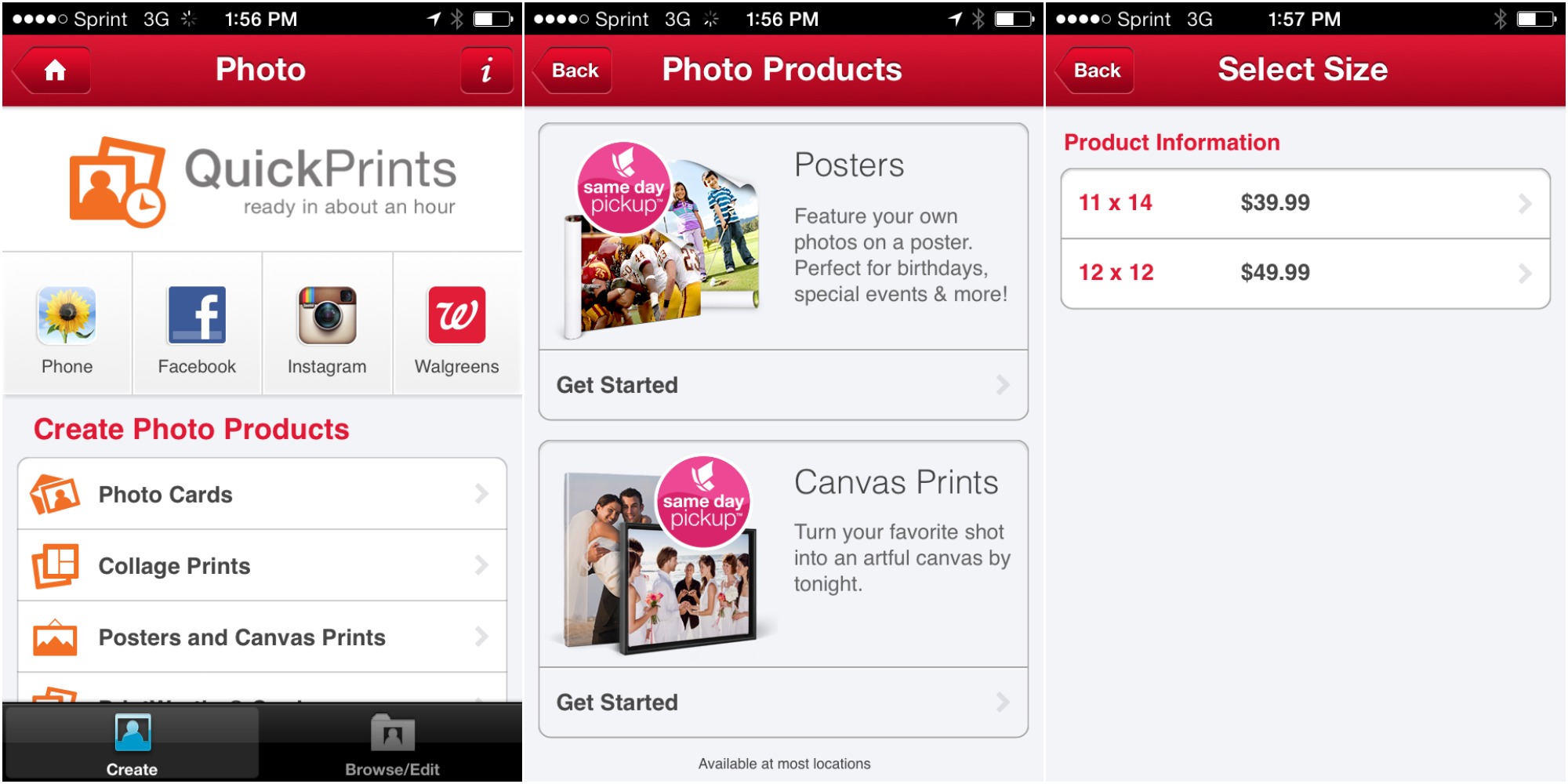
Open the app and choose “Photo”.  You’ve got options here of what types of product you want to create.  Select the product (or if you want to order traditional prints from your social accounts or Walgreens account, choose those icons).  I selected Posters and Canvas Prints to get started on my canvas.
How to Print Photo Gifts in One Hour From Your Phone with the #WalgreensApp at www.happyhourprojects.com #shop

Select your photo, upload it, then choose the canvas size you want.  The outer box is where the canvas will be trimmed, and the inner box is the line where it will be wrapped.  You want to be sure your whole photo will fit in that inner box, because that will be the front of your canvas.

How to Print Photo Gifts in One Hour From Your Phone with the #WalgreensApp at www.happyhourprojects.com #shop

Next, send your order to your home store – you can even use a coupon code if you have one!  I get all the emails from Walgreens photo and take advantage of their coupon codes all the time – it’s perfect for on-the-go ordering like this!  Take a look at my screen shots – even on 3G (no WiFi!), it was only 6 minutes from the time I opened the app until the time I opened my confirmation email.  Half that time was the upload of my file – on a moving data connection.  Not bad.

How to Print Photo Gifts in One Hour From Your Phone with the #WalgreensApp at www.happyhourprojects.com #shop

You can also select a store on the way to wherever you’re headed in true last-minute fashion… just grab some wrapping paper (or hey – just a bow?) while you are at Walgreens!

How to Print Photo Gifts in One Hour From Your Phone with the #WalgreensApp at www.happyhourprojects.com #shop

This canvas is joining a matching size of my daughter on my mom’s wall.  We update her collection each year, but this is the first year that our son Roman will go up on the wall too!  I love canvases.  They are so much more polished and contemporary than traditional prints and they make awesome gifts.

How to Print Photo Gifts in One Hour From Your Phone with the #WalgreensApp at www.happyhourprojects.com #shop

What’s your go-to last minute gift?  Do you love gifting photos?

Adrianne Signature

Filed Under: Christmas, Sponsored Tagged With: #WalgreensApp, easy, photo gifts, Walgreens Mobile App, Walgreens Photo

copyright policy and terms of use

I love it when you love my work! All tutorials and photos published at Happy Hour Projects are copyrighted. If you would like to feature my tutorial on your website or share it on your social media you may use one photo to feature, as long as you provide a link back to the original post.

If you feature a photo, it may not be accompanied by the project tutorial or recipe, whether in my own words as it originally appears or paraphrased by you. This also includes personal sharing on social media and Pinterest. Publishing multiple photos from a project, or including instructions with an accompanying photo are not permitted and you will be asked to remove them.

I love to share my projects, and my tutorials, recipes, and e-books are ALL free for your personal use. However, photos and ideas that are published to this site are my protected intellectual property. You may print them at home, but please do not copy or distribute them. I also allow all designs to be made and sold at fundraisers, craft fairs, etc. If you are selling a piece made from one or more of my free tutorials in your online shop, I require that you use your own, original photography, and include a link back to my website to credit me as the designer.

I hope you enjoy what you read here, and please be fair when you share!

Reader Interactions

Comments

  1. Techy says

    05/11/2015 at 9:02 am

    Wow…he is so adorable!!!!! I really liked your idea and technique too and it’s so easy through the mobile phone.

    Reply
  2. Marilyn says

    01/04/2014 at 10:33 am

    What a great photo! I didn’t know that Walgreens photo center could make wrapped canvas photos! Can they do this with a previously developed photo (like an old photo)?

    Reply
    • Adrianne says

      01/05/2014 at 7:25 pm

      You know, I don’t know everything they can do, but I bet they can! It’s just like enlargements, as long as the resolution is enough, they can do it!

      Reply
  3. Bethany says

    12/21/2013 at 5:27 pm

    Photo canvas from your phone?! So cool!

    Reply
  4. Kara says

    12/20/2013 at 10:58 pm

    I love the Walgreens photo app. What a great gift idea!!

    Reply
  5. Kelly says

    12/17/2013 at 3:05 pm

    I haven’t done a photo canvas yet but I totally need to! One of my cousins has a wall of assorted canvases that looks amazing! #client

    Reply
  6. Sky says

    12/17/2013 at 11:28 am

    12×12 from your PHONE?!? And the quality looks great- he couldn’t be cuter! LOVE the Walgreens app :)

    Reply
  7. Tara says

    12/17/2013 at 2:58 am

    Okay – that baby is adorable! I want to smoosh those gorgeous big cheeks!

    But how cool that you can order a canvas from your phone? Perfect for the Instagram-addicts out there!

    Reply
  8. Kadie says

    12/16/2013 at 9:23 pm

    Awwwww his is SO adorable! What a fun canvas. :)

    Reply
  9. amy says

    12/16/2013 at 1:41 pm

    Wow! Now that was easy! And how cute is Roman?! Awww!

    Reply
  10. Kathy says

    12/16/2013 at 11:31 am

    Oh my gosh…that is just the cutest! What a great gift to give, get, and cherish!

    Reply
  11. Melanie says

    12/16/2013 at 9:31 am

    I always give photo gifts. They make a wonderful gift!

    Reply

Leave a Reply Cancel reply

Your email address will not be published. Required fields are marked *

Primary Sidebar

Hello, and welcome! I'm Adrianne, an artist, author, designer, and blogger in mid Michigan. I work from home, chase my two kids, and this once-city-girl is learning how to care for chickens and adjusting to life out in the country. I have a compulsion for daily creativity... sometimes it's jewelry-making, paper crafting, metal stamping, mixing and baking, or giving new life to recycled items. But with 2 young kids, time is short! My goal here at Happy Hour Projects is to share projects and tips that you can do in an hour or less. The ideas you find here are designed to add a little creativity in your day, no matter how much (or how little) time you have!

BUY MY BOOKS!

Copyright © 2026 Happy Hour Projects on the Brunch Pro Theme